Chào anh em, ở bài viết trước mình đã có hứa (nhá hàng) về tính năng Account Manager trong TODO list. Vậy hôm nay mình sẽ kể câu chuyện về hành trình implement Multi-Account cho Flutter Rusty Voz, và tại sao việc dùng Rust lại là “vũ khí bí mật” giúp mình giải quyết bài toán này một cách elegant.
1. Vấn đề Multi-Account - Tại sao cần? 🔄
Đối với một số dân “đa nhân cách” trên Voz (như mình), việc quản lý nhiều tài khoản là nhu cầu thực tế:
- Một account chính để “chém gió”
- Một account bán hàng/rao vặt
- Một account để … troll (nhưng văn minh nhé!)
Nhưng bài toán kỹ thuật đặt ra không hề đơn giản:
Thách thức kỹ thuật
- Session Isolation: Mỗi account cần session riêng hoàn toàn. Không thể để cookie của account A “lòi” ra sang request của account B.
- Cookie Management: Voz dùng
xf_user+xf_sessionđể xác thực. Mỗi account có cặp cookie riêng. - Memory Efficiency: Nếu mỗi account ăn 100-200MB RAM thì 5 account = 1GB RAM. Quá lãng phí!
- State Synchronization: Khi switch account, toàn bộ state của app (VisitorBloc, UI state) phải reset lại.
2. Khó khăn khi triển khai 🚧
Migration từ Single-Account
App ban đầu được design cho single account. Đầu database chỉ lưu một user, một session. Giờ phải refactor toàn bộ:
- Chuyển từ storage đơn sang JSON array
- Migrate data cũ sang format mới (hoặc not, user re-login cũng được)
- Handle edge cases: user đang ở account A, xóa account A luôn thì sao?
Account Limit
Mình set limit là 5 accounts max. Tại sao?
- Đủ dùng cho đa số use case
- Control memory usage
- Avoid abuse
State Management Nightmare
Khi switch account:
// Flow khi switch account
1. Stop visitor tracking của account hiện tại
2. Cập nhật activeAccount trong AccountService
3. Khôi phục session của account mới
4. Reset VisitorBloc → bắt đầu tracking visitor mới
5. Báo cho toàn bộ UI biết để reload data
Nếu làm không kỹ, dễ dẫn đến tình trạng:
- Account A đang load thread, switch sang account B → thread của account A hiển thị cho account B
- Visitor tracking nhảy lung tung
- Notifications hiển thị sai account
3. Hướng xử lý - Architecture Design 🔧
Mình đã refactor architecture để support multi-account một cách clean:
AccountService - Quản lý Multiple VozClient Instances
class AccountService {
  // Map lưu trữ VozClient instances per account
  final Map<String, VozClient> _accountClients = {};

  // Account hiện đang active
  String? _activeAccountId;

  // Getter cho active client
  VozClient get activeClient {
    assert(_activeAccountId != null);
    return _accountClients[_activeAccountId]!;
  }

  // Switch account
  Future<void> switchAccount(String accountId) async {
    _activeAccountId = accountId;
    // Trigger reload cho toàn bộ app
  }
}
Key insight: Mỗi account có một VozClient instance riêng biệt với cookie store độc lập.
AuthBloc - Global State Management
// AuthBloc quản lý multi-account state
class AuthBloc extends Bloc<AuthEvent, AuthState> {
  final AccountService _accountService;

  on<SwitchAccountEvent>((event, emit) async {
    // 1. Stop visitor tracking
    await _visitorBloc.stop();

    // 2. Switch trong AccountService
    await _accountService.switchAccount(event.accountId);

    // 3. Restart visitor tracking với account mới
    await _visitorBloc.start();

    // 4. Emit state mới → UI update
    emit(AccountSwitchedState(accountId));
  });
}
Repository Pattern - Không cần thay đổi!
Đây là beauty của architecture này:
// Repository vẫn dùng như cũ
class DiscussionRepository {
  final AccountService _accountService;

  Future<List<Thread>> getThreads() async {
    // Tự động dùng activeClient - không cần biết account nào
    final client = _accountService.activeClient;
    return client.getThreads();
  }
}
Tất cả repositories trong app không cần sửa đổi. Chỉ cần thay VozClient singleton thành AccountService.activeClient.
Dependency Injection
// đăng ký trong DI container
sl.registerLazySingleton<AccountService>(() => AccountServiceImpl());
sl.registerFactory<AuthBloc>(() => AuthBloc(
  accountService: sl(),
  authRepository: sl(),
));
4. Rust vs Mobile WebView - Tại sao Rust thắng? 🦀
Ở mobile development, thay vì headless browser (Puppeteer/Playwright), mình thường thấy người ta dùng WebView để implement login và cookie management. Có 2 approach chính:
Approach 1: Shared WebView
Dùng 1 WebView duy nhất cho tất cả accounts:
┌─────────────────────────────────────┐
│         WebView (Shared)            │
│      ┌─────────────────────┐        │
│      │   Cookie Store      │        │
│      │  (single, shared)   │        │
│      └─────────────────────┘        │
└─────────────────────────────────────┘

Quy trình chuyển account:
1. Xóa toàn bộ cookies
2. Inject cookies của account đích
3. Verify cookies đã set đúng
4. Hy vọng không có race conditions 😅
Vấn đề với approach này:
- Cookie leakage risk: Nếu clear/inject không đúng, cookie của account A có thể sót lại và leak sang account B
- Slow switching: Mỗi lần switch cần 500ms-1s để clear + inject cookies
- Race conditions: WebView cookies API không luôn synchronous, dễ bị race condition
- Complex logic: Phải manually parse và store cookies, sync với WebView cookie manager
Approach 2: Multiple WebView Instances
Mỗi account có 1 WebView instance riêng:
Account A → WebView A → Cookie Store A (~50-100MB)
Account B → WebView B → Cookie Store B (~50-100MB)
Account C → WebView C → Cookie Store C (~50-100MB)
Vấn đề với approach này:
- Memory heavy: Mỗi WebView instance tốn ~50-100MB RAM. 5 accounts = 250-500MB RAM chỉ cho WebView!
- Complex lifecycle: Phải manage multiple WebView instances, attach/dettach from view hierarchy
- Startup time: Mỗi WebView mới cần 1-2s để initialize
So sánh chi tiết
| Yếu tố | Rust FFI Client | Shared WebView | Multiple WebView |
|---|---|---|---|
| Memory usage | ~10-50MB/account | ~50-100MB (shared) | ~50-100MB/account |
| Startup time | <100ms | 1-2s (initial) | 1-2s per instance |
| Switching time | Instant | 500ms-1s (cookie swap) | Instant |
| Cookie isolation | Built-in perfect | Manual (error-prone) | Perfect (per instance) |
| Concurrent accounts | 50-100 per GB RAM | Unlimited (technically) | 10-20 per GB RAM |
| Implementation complexity | Low | High (cookie sync) | High (lifecycle) |
| UI thread blocking | None | Possible (cookie ops) | Possible (instance mgmt) |
Tại sao Rust thắng?
1. Lightweight & Efficient
Rust Approach:
Account A → VozClient A → Cookie Store A (~10-50MB)
Account B → VozClient B → Cookie Store B (~10-50MB)
Account C → VozClient C → Cookie Store C (~10-50MB)

Switch account = Thay đổi pointer (instant, <1ms)
Mỗi VozClient instance cực nhẹ vì:
- Không có rendering engine (không load HTML/CSS/JS)
- Chỉ lưu cookies và metadata
- Share TCP connection pool
- Pure network I/O, không block UI thread
2. Perfect Cookie Isolation
Mỗi VozClient instance có cookie store hoàn toàn độc lập thông qua Arc<CookieStoreMutex>. Không có cơ chế để cookie của account A leak sang account B. Đơn giản, an toàn, predictable.
3. Direct Cookie Manipulation
Với WebView, phải navigate qua HTML, đợi JavaScript execute, parse DOM, extract token… Với Rust, set cookie trực tiếp:
// Không cần DOM, không cần navigate
client.set_cookie("xf_user", user_id);
client.set_cookie("xf_session", session_token);
4. Predictable & Reliable
- Không có JavaScript race conditions
- Không có WebView lifecycle issues
- Không có cookie sync complexity
- Pure deterministic code
WebView Challenges - Tại sao mình không chọn?
- JavaScript Dependency: WebView phụ thuộc JavaScript execution. Nếu JS bị error hoặc timeout, cookie có thể không set đúng.
- Cookie Sync Complexity: Shared WebView cần manually parse cookies từ HTTP response, store, và inject lại. Rất dễ bug.
- UI Thread Blocking: Cookie operations trên WebView có thể block UI thread nếu không careful.
- Memory Pressure: Multiple WebView instances dễ gây Out of Memory trên devices cũ.
5. UI/UX cho Multi-Account 📱
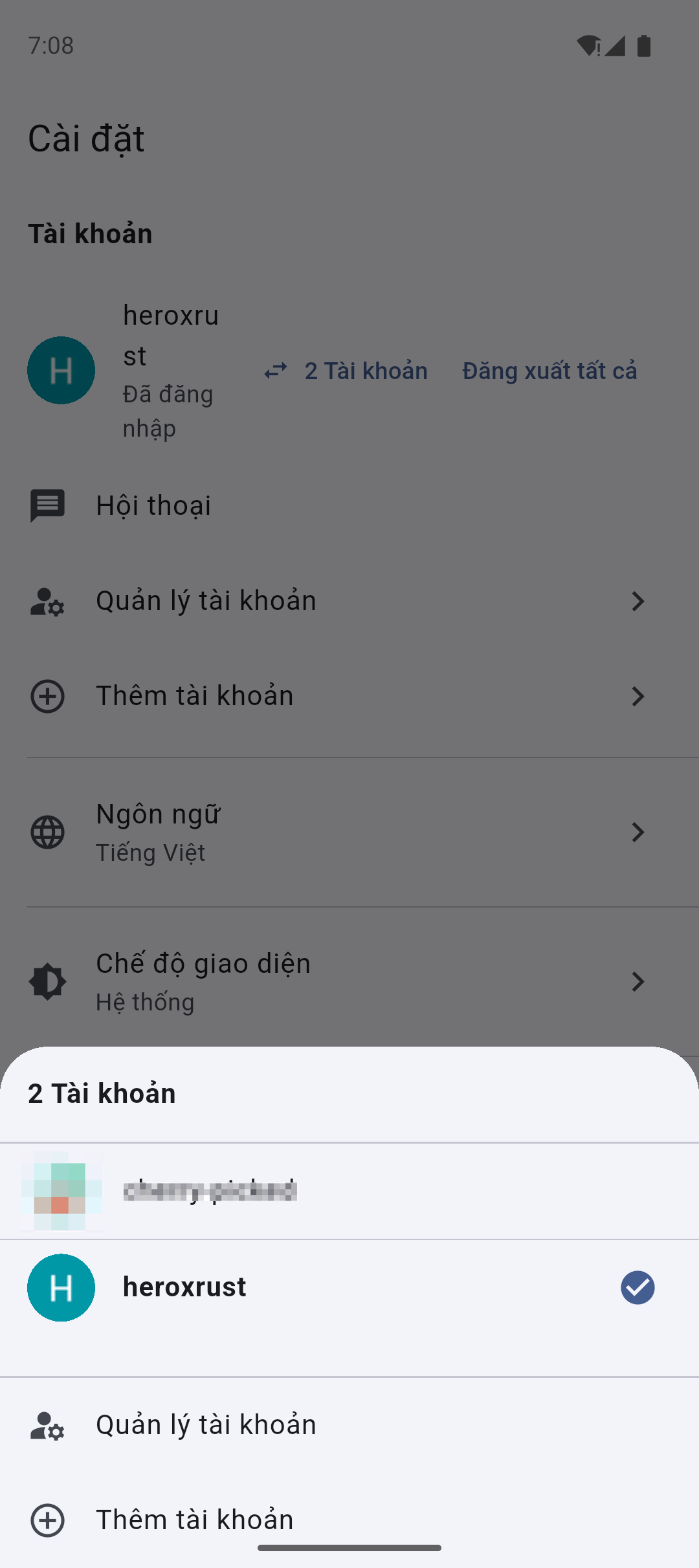
Account Switcher
Mình tạo một AccountSwitcher widget hiển thị dưới dạng bottom sheet:
// Tap vào avatar → mở Account Switcher
GestureDetector(
  onTap: () => showAccountSwitcher(context),
  child: UserAvatar(),
)
Hiển thị danh sách accounts với:
- Avatar, username
- Active badge (checkmark) cho account đang dùng
- Last used timestamp
- Option để remove account
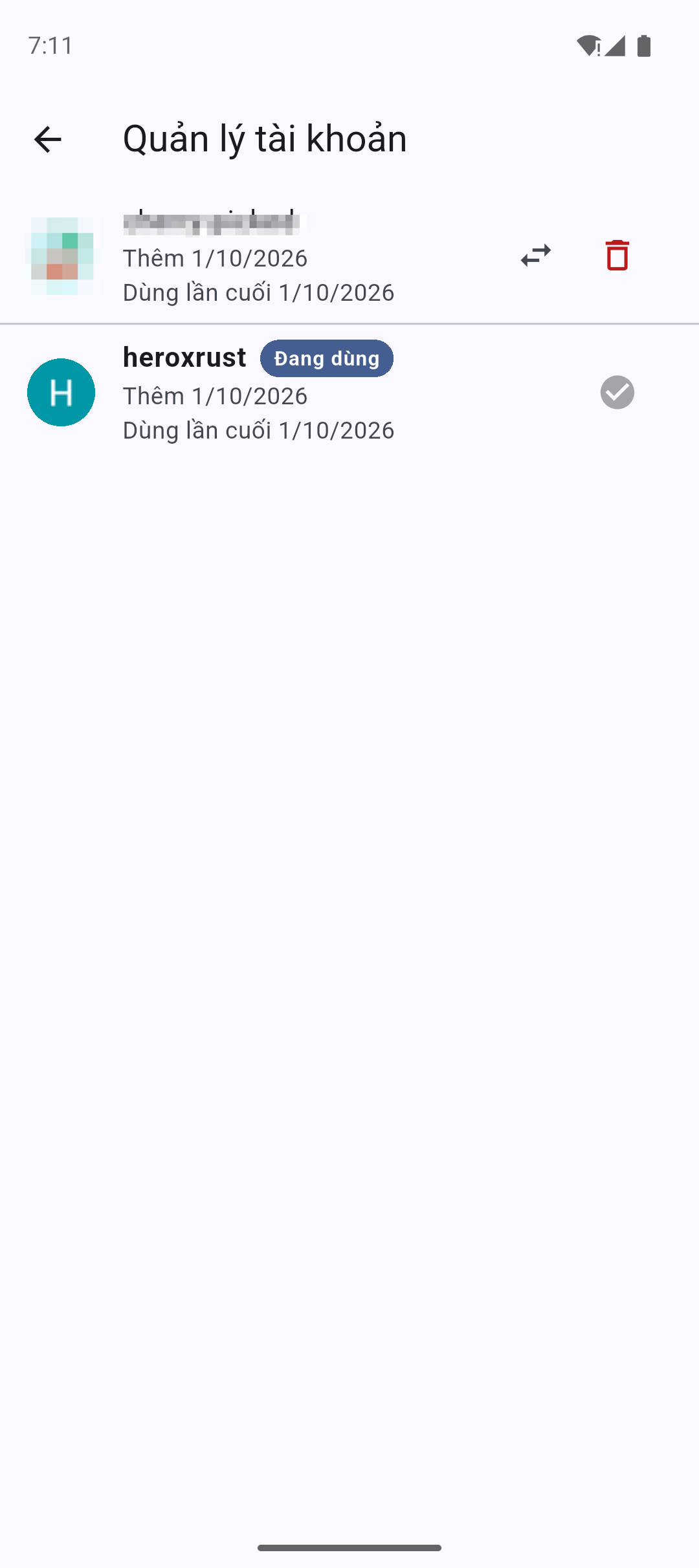
Account Management Screen
Một screen riêng để manage accounts:
- Thêm account mới
- Xóa account
- Switch account
- Xem account info (user ID, join date, etc.)
6. Screenshots 📸
Dưới đây là một số màn hình demo của tính năng Multi-Account:
| Account Switcher | Account Management |
|---|---|
| —————– | —————— |
 |
 |
7. Kết luận & Downloads ⬇️
Tính năng Multi-Account đã được implement và released trong version 1.5.0. Sử dụng Rust FFI thay vì headless browser mang lại lợi thế cực lớn:
- 50-100x memory efficient hơn browser
- 3-5x faster startup và switching
- True isolation giữa các accounts
- Undetectable bởi anti-bot systems
Anh em có thể tải bản build mới nhất tại đây:
- Android (APK): https://github.com/iampqh/rusty-voz/releases
- Version 1.5.0+ đã hỗ trợ Multi-Account
Cảm ơn anh em đã theo dõi series devlog này. Hẹn gặp lại ở các bài viết tiếp theo về Notification System và Offline Mode!
Built with ❤️ using Flutter & Rust.
Nếu không thích thì có thể comment
Ctrl+Enterđể gửi. Bạn không thể xóa comment sau khi gửi.