Overall
VPC contains one or more subnets
- A subnet exist in only one availability zone
- A instance exist in only one subnet
=> Create instances in different availability zones
a VPC is only exist in 1 AWS region
3 ways to access resources in VPC
- Directly over the internet
- Over a virtual private network
- Over a direct connect link
If you want to connect from another VPC or on-premise, you can use Transit Gateway
Transit Gateway is a highly available resource => don’t have to create multiple transit gateways for redundancy
CIDR
Classless Inter-Domain Routing - a method for allocating IP addresses
Used in Security Groups rules and AWS networking in general
They help to define an IP address range:
- ww.xx.yy.zz/32 => one IP
- 0.0.0.0/0 => all IPs
$$ => number\ IPs = 2^{32 - x} $$
A CIDR consists of 2 components:
- Base IP
- Subnet mask
Subnet mask
The subet mask basically allows part of the underlying IP to get additional next value form the base IP 192.168.0.0/30
=> 4 IPs
=> 192.168.0.0 -> 192.168.0.3
Public vs private IP (IPv4)
IANA established certain blocks of IPv4 addresses for the use of private (LAN) and public (Internet) addresses
- Private IP can only allow certain values:
- 10.0.0.0/8 (in big networks)
- 172.16.0.0/12 (AWS default VPC in that range)
- 192.168.0.0/16 (home network)
- All the rest of the IP addresses on the Internet are Public
Elastic IP Address
Allocate an EIP to your account and keep it as long as you want
EIP allows an instance to retain the same public IP address
EIP is bound to an ENI, which is attached to an instance
You can move an EIP to different ENI
If an instance has a public IP address, allocating an EIP to the instace will replace the public IP address
2 types of EIP Addresses
- Amazon owned
- Tied to an AWS region
- AWS pick for you
- Customer owned
- Bring your own IP
- Pick any address you want
EIP is for use in a specific Region only, cannot move to a different One
Gloabal accelerator
Provides two anycast IPv4 addresses
Anycast: All servers have same IP address, client will request to nearest server
Unicast: Each server has a different IP address
Not tied to any AWS region
Advertised from points-off-presence (POPs) around the world
Connections to a Global Accelerator address can be forwarded to resources in any AWS region
Cloudfront vs Global Accelerator
Both use network system and edge location globally
Both can integrate AWS Shield for DDos
| Cloudfront | Global Accelerator |
|---|---|
| Improve performance with caching content in Edge locations | Improve performance with TCP and UDP |
| Client send request first time, content will be cached in Edge. For next requests, content will get from cached edge |
VPC
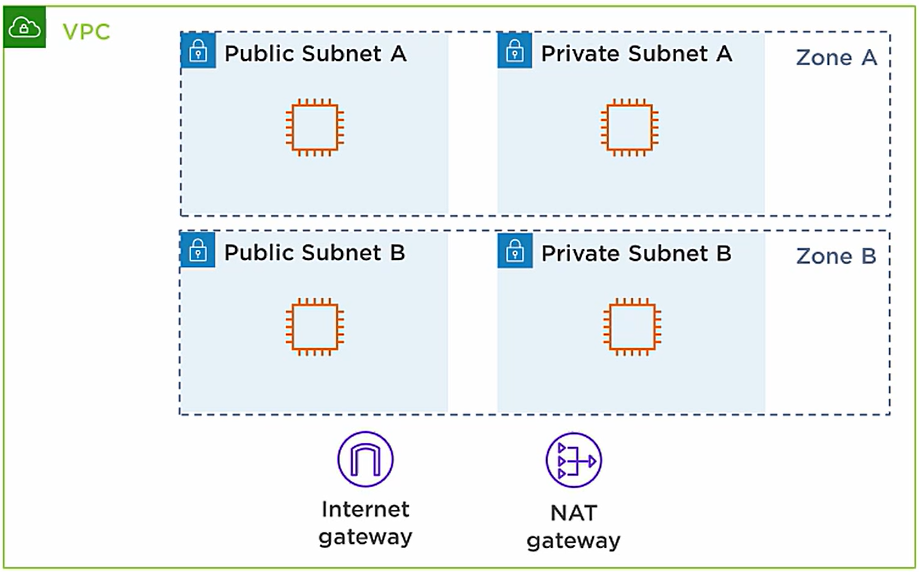
Max. CIDR per VPC is 5, for each CIDR:
- Min. size is /28 (16 addresses)
- Max. size is /16 (65536 addresses)
Note: Your VPC CIDR should NOT overlap with your other VPCs or networks (e.g. corporate)
Public subnet:
- Will have full access to the internet
- Can reach the internet & can be reachable from the internet
Private subnet:
- Completely isolated from the internet
- Cannot reach the internet & the internet can’t reach them
NAT gateway
provide instances in the private subnet outbound-only internet access
Internet gateway
Allows resources (e.g. EC2 instances) in a VPC connect to the internet
It scales horizontally and is highly available and redundant
One VPC can only be attached to one IGW and vice versa
Internet Gateways on their own do not allow Internet access
=> Route tables must also be edited!

Bastion Hosts
Bastion host is an EC2 instance in a public subnet and it’s a bastion because we go through it =)))
So we ssh to bastion host and the bastion host ssh into the EC2 Instance of the private segment. This is a concept of the hop.
Note: Make sure the bastion host only has port 22 traffic from the IP address you need
NAT Instance (outdated)
NAT = Network address translation
Allow EC2 instances in private subnets to connect to the Internet
Must be launched in a public subnet
Must disable EC2 setting: Source / destination Check
Must have EIP attached to it
Route Tables must be configured to route traffic from private subets to the NAT instance
Comments:
- Pre-configured AMI is available
- Not highly available / resilient setup out of the box
- Internet traffic bandwidth depends on EC2 instance type
- Must manage Security Groups & rules:
- Inbound:
- Allow HTTP/HTTPS traffic coming from Private Subnets
- Allow SSH from your home network (through IGW)
- Outbound:
- Allow HTTP/HTTPS traffic to the internet
- Inbound:
NAT gateway
AWS-managed NAT, higher bandwidth, high avaibility, no administration
Pay per hour for usage and bandwidth
NATGW is created in a specific AZ, uses an Elastic IP
Can’t be used by EC2 instance in the same subnet (only from other subnets)
Requires an IGW (private subnet => NATGW => IGW)
5Gbps of bandwidth => auto scaling up to 45 Gbps
No Security Groups to manage / required
NATGW is resilient within a single AZ
=> Must create multiple NATGWs in multiple AZs for fault-tolerance
There is no cross-AZ failover needed because if an AZ goes down, it doesn’t need NAT
Nếu không thích thì có thể comment
Ctrl+Enterđể gửi. Bạn không thể xóa comment sau khi gửi.