DNS Resolution
Domain Name System is a standard by which names used on the internet are resolved to their corresponding IP addresses.
enableDNSSupport (= DNS Resolution setting)

Decides if DNS resolution from Route 53 Resolver server is supported for the VPC
- True (default): it queries the Amazon Provider DNS Server at 169.254.169.253 or the reserved IP address at the base of VPC IPv4 network range plus two (xx.xx.xx.2)
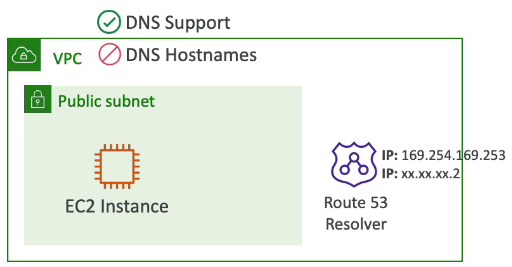
enableDNSHostname (= DNS Hostname setting)

By default,
- True => default VPC
- False => newly created VPCs
Won’t do anything unless enableDNSSupport=true
Connectivity Options
Direct Connect
Low-latency connection to an AWS region
Bypasses the Internet
2 types:
- Delicated
Physical connection that terminates at a Direct Connection location
1 or 10 Gbps
- Hosted
“last-mile” connection provided by a Direct Connect partner
50 Mbps to 10 Gbps
Virtual private network (VPN)
Encrypted IPsec connection over the internet
Unpredictable latency
Can be implemented in 2 ways:
- Virtual private gateway
- Transit gateway
Virtual Private Gateway
Enables you to establish a VPN tunnel with only one VPC
Doesn’t scale well
Transit gateway
Connects VPCs and on-premises networks
- Terminates multiple VPN connections
- Supports Direct Connect
Connects multiple VPCs together
Transit Gateway Route Tables
- Control how traffic is routed between subnets
- Can block (blackhole) traffic
Trasit gateway supports multicast!!!
VPC Peering
Privately connect 2 VPCs using AWS’ network
Make them behave as if they were in same network
Must not have overlapping CIDRs
VPC Peering connection is NOT transitive (must be established for each VPC that need to communicate with one another)
You must update route tables in each VPC’s subnets to ensure EC2 instances can communicate with each other
Good to know
- You can create VPC Peering connection between VPCs in different AWS accounts/regions
- You can reference a security group in a peered VPC (works cross accounts - same region)
VPC Endpoints (AWS privateLink)
VPC endpoinst are private endpoints within your VPC that allow you to initiate a private connection to the AWS services
- Every AWS service is publicky exposed (public URL)
- VPC endpoints allows you to connect to AWS services using a private network instead of using the public internet
- They’re redundant and scale horizontally
- They remove the need of IGW, NATGW, .. to access AWS services
- In case of issues:
- Check DNS Setting Resolution in your VPC
- Check route tables
2 types:
-
Interface Endpoints
- Provisions an ENI (private IP address) as an entry point (must attach a Security Group)
- Supports most AWS services
-
Gateway Endpoints
- Provisions a gateway and must be used as a target in a route table
- Supports both S3 and DynamoDB
Nếu không thích thì có thể comment
Ctrl+Enterđể gửi. Bạn không thể xóa comment sau khi gửi.